
While the current development landscape is largely dominated by AI assistants, peak productivity still relies on a core set of fundamental tools working silently to ensure code quality and agility.
These extensions are essential for transforming your editor into a high-performance workstation, allowing the developer to maintain focus on logic while the tools handle the visual and organizational infrastructure.
Below are the four indispensable extensions for your development environment and the reasons why they have become industry standards:
1. Error Lens
Error Lens is a diagnostic tool that drastically changes how we handle code failures. Instead of requiring the developer to hover over an underlined line or open the problems panel, it displays error messages and warnings directly in the line of code.
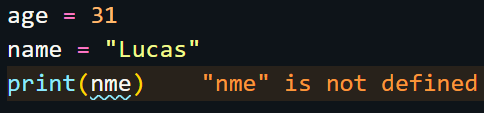
- The Advantage: It saves valuable time by making failures immediately visible as you type. When combined with TypeScript, for example, it helps identify complex typing errors much faster, maintaining code quality without breaking your “creative flow.”
2. Better Comments
The main strength of this tool is its ability to categorize comments using simple prefixes that change the text’s color and style. This allows the developer to instantly identify the intent of a note without needing to read every word:
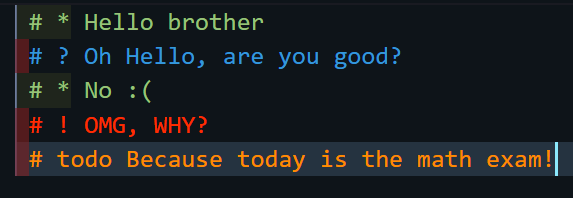
- Alerts (!): Highlighted in red to signal danger or critical warnings.
- Queries (?): Usually in blue, ideal for questions or points needing clarification.
- Tasks (TODO): In orange or yellow, to highlight what still needs to be done.
- Highlights (*): For annotations that deserve special notice.
- Strikethrough (//): Used to indicate code or ideas that should be disregarded.
Strategic Tips:
- Avoid Noise: It is recommended to align with your team on using only 2 or 3 main tags to avoid creating excessive “visual noise” in the code.
- Pair with TODO Tree: A powerful practice is pairing Better Comments with the TODO Tree extension. While one beautifies the comment, the other groups all these tags into a side panel, providing a macro view of all pending tasks in the repository.
- Security: Remember not to include sensitive information in comments; instead, use tags to link to external tickets or documentation.
3. Color Highlight
The Color Highlight extension is an essential tool for improving visual clarity during development, especially for design-heavy tasks.
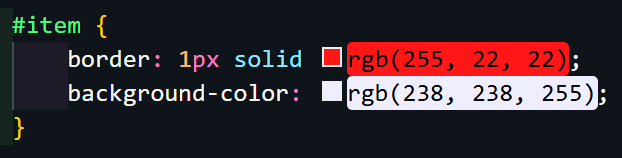
Its primary function is to provide inline color previews directly in the code. This means that when writing a color code, the extension highlights the text or background with the actual corresponding color, allowing the developer to visualize the result immediately without external tools.
- Personal Insight: I have used this one extensively; it is particularly useful for handling CSS Variables and Design Tokens.
4. Live Server
For me, Live Server is an indispensable productivity tool that launches a local development server for static files.
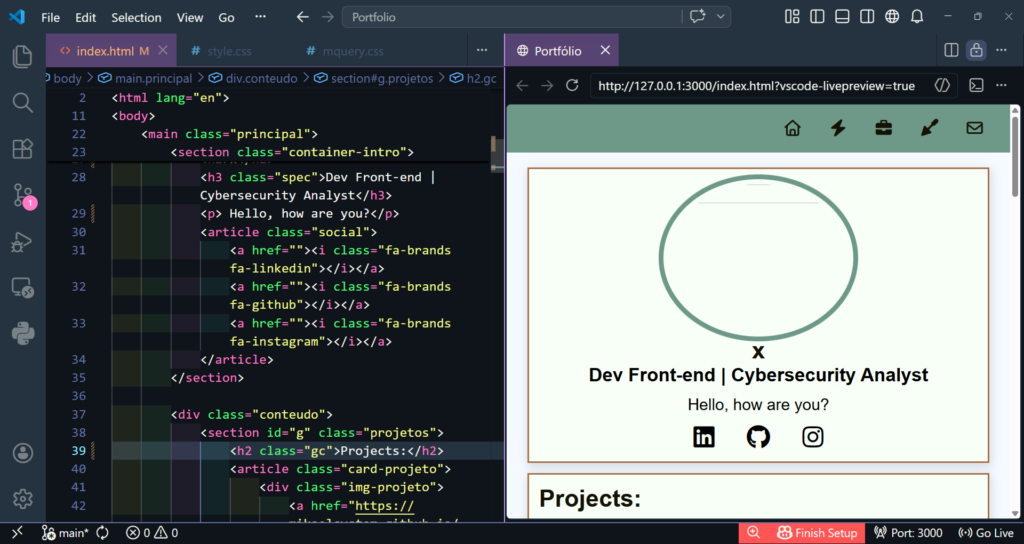
- The Advantage: It provides real-time previews of HTML, CSS, and JavaScript with an auto-reload feature. This allows developers to perform rapid experiments and see results instantly in the browser, drastically accelerating the feedback loop in the front-end.
Conclusion
By integrating these four tools: Error Lens, Better Comments, Color Highlight, and Live Server, you create an ecosystem that prioritizes visibility, consistency, and speed. These extensions work in harmony with modern AI editors, ensuring that even in an era of automation, your code remains robust, well-documented, and easy to test.